

Rent Application allows you to order most reports after you have received an application 2 different ways:
1. You can pay for the reports yourself using a credit card.
2. You can send a request for payment directly to the applicant.*
*Please note that this is currently not an option for Experian credit reports. If you are interested in a pre-screening credit report workflow, please contact support@rentapplication.net.
For either method, first click to view the application you would like to order reports for. Next, click on the corresponding tab for the report you would like to order. You will see an option to pay for the report yourself or send a request for payment.
If you pay for the report, you can choose to store your credit card information for future use. Once payment is processed, the report will be requested immediately and should finish processing within a few minutes.
If you decide to send a request for payment to the applicant, you will be able to select one or more reports to request payment for. Select the reports to request, and then click on "Send Applicant Payment Request." The applicant will receive an email with a direct link to pay for their reports.
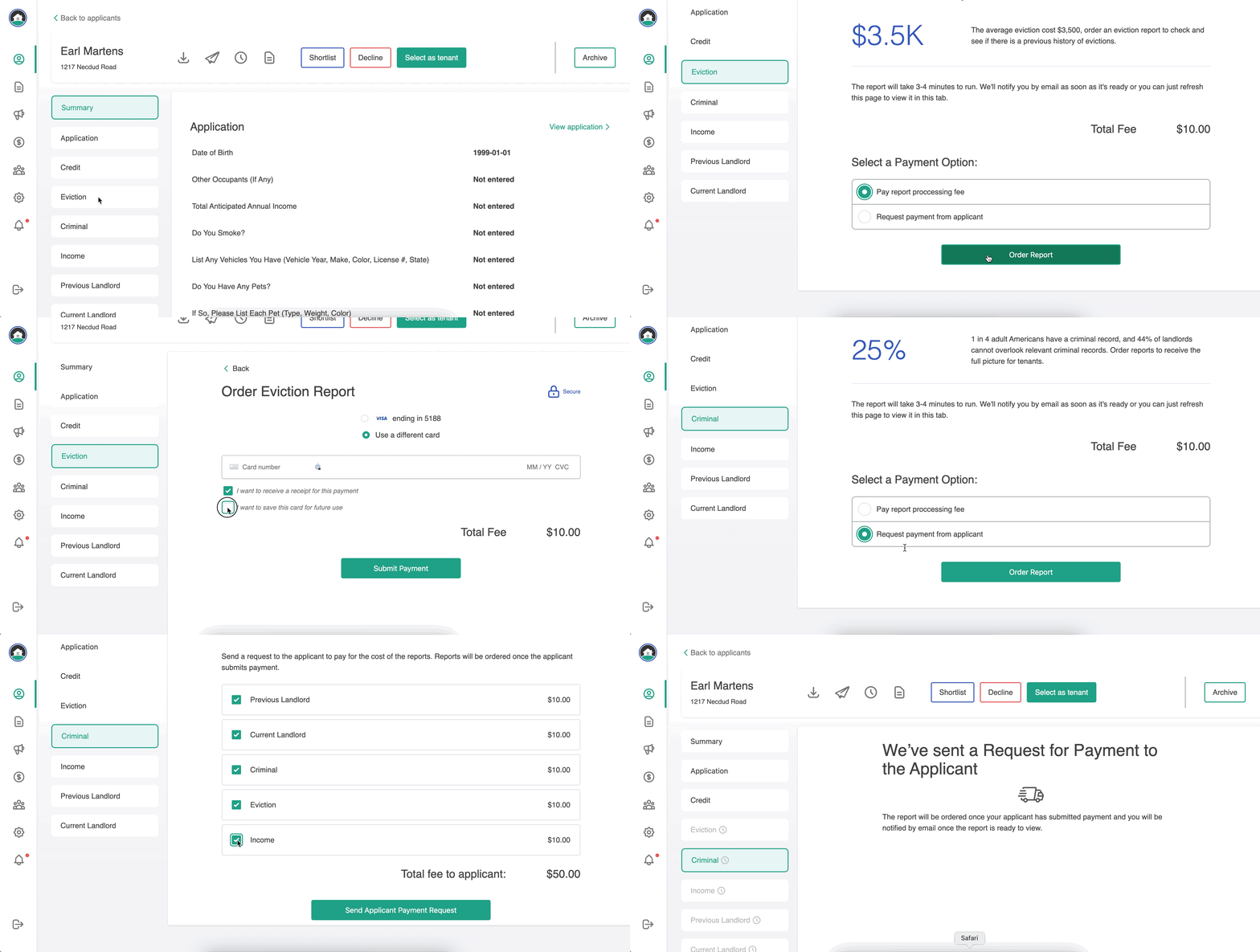
Once payment is processed, the report(s) will be requested immediately and should finish processing within a few minutes!
Other questions?
Our support team is always here to help you and your prospective tenants! Our team is based in the U.S. and responds directly to emails 7 days a week.
We can be reached at support@rentapplication.net